

By Tor Flugsrud & Eva Hageselle
Are you one of those who find the process surrounding sick leave reimbursement both complicated and time-consuming? Do you struggle to keep up with the rules? And do you find that sick leave reimbursements are lost because claims are sent too late to NAV? We completely agree that the reimbursement process can be both complicated and time-consuming, and unfortunately, we have seen money go down the drain because deadlines were missed.
The good news? There is an excellent solution that helps you manage the entire reimbursement process! This solution is delivered in SAP payroll , and is available to both those who have SAP payroll onprem, and for those of you who have chosen the cloud solution SAP Employee Central Payroll (ECP).
If you have SAP payroll onprem, ECP, or a completely different payroll system, we would still recommend you read the rest of this article. Our claim is that the reimbursement solution in SAP will simplify and improve reimbursement work for the vast majority of Norwegian companies!
For those who advance sick pay – and everyone else
Reimbursement of sickness benefits in SAP will be useful both for those who advance sick pay beyond the employer period, and for those who do not. Nice and simple.
Clear benefits
Since 2019, NAV has required income reports to be submitted electronically via Altinn, which is easily done right from SAP. This is just one of several reasons why we recommend that you and your business start using the reimbursement solution in SAP.
The most obvious benefits of using the reimbursement solution are:
- You, as an employer, avoid losing money due to missing the 3-month deadline for claiming reimbursement from NAV.
- You save a lot of manual work related to managing reimbursement claims.
It might come as a bit of a surprise that sick leave reimbursement can be an important contributor to the company's value creation, but it really is. First, by helping you avoid lost income from missed reimbursements. Second, because you can significantly cut costs linked to the tedious process of preparing income statements (dates, amounts, etc.), submitting claims to NAV, and following up and reconciling reimbursement claims.
Here are a few more benefits you will easily gain by using the reimbursement solution in SAP:
- The solution helps you follow the rules. For example: When does a benefits period start? When does a new employer period start? When has the employee reached the maximum limit for sick pay or parental leave?
- You avoid manual calculations of the reimbursement basis. SAP calculates both fixed and variable reimbursement bases. When it comes to the variable basis, it is calculated as an average of variable payments from previous months. You choose how many months to base this calculation on.
- Expected reimbursement is calculated automatically in the payroll settlement as soon as the absence is registered. If you like, you can book the expected reimbursement as income in your accounts right away. Others prefer to wait until the reimbursement actually arrives, i.e., when the K27 list is received.
- Reconciliation between expected and actually received reimbursement. This report is a huge help when following up on submitted claims.
Sick leave reimbursement – simple and flexible
The reimbursement solution in SAP is flexible in several ways; it allows you to easily separate the following:
- Sickness benefit, own illness
- Parental leave
- Pregnancy benefit
- Care benefit, sick child or illness of childminder
- Attendance allowance for children
- Attendance allowance for close relatives
- Training allowance for sick children
As an employer, the reimbursement solution in SAP gives you the opportunity to practice different schemes/policies for different groups of employees. For example:
- For employees on a fixed monthly salary, advances are made payroll during illness.
- For hourly paid employees, sick leave payroll is not advanced beyond the employer period.
- Sick leave payroll is limited to 6G – yes or no.
The reimbursement process
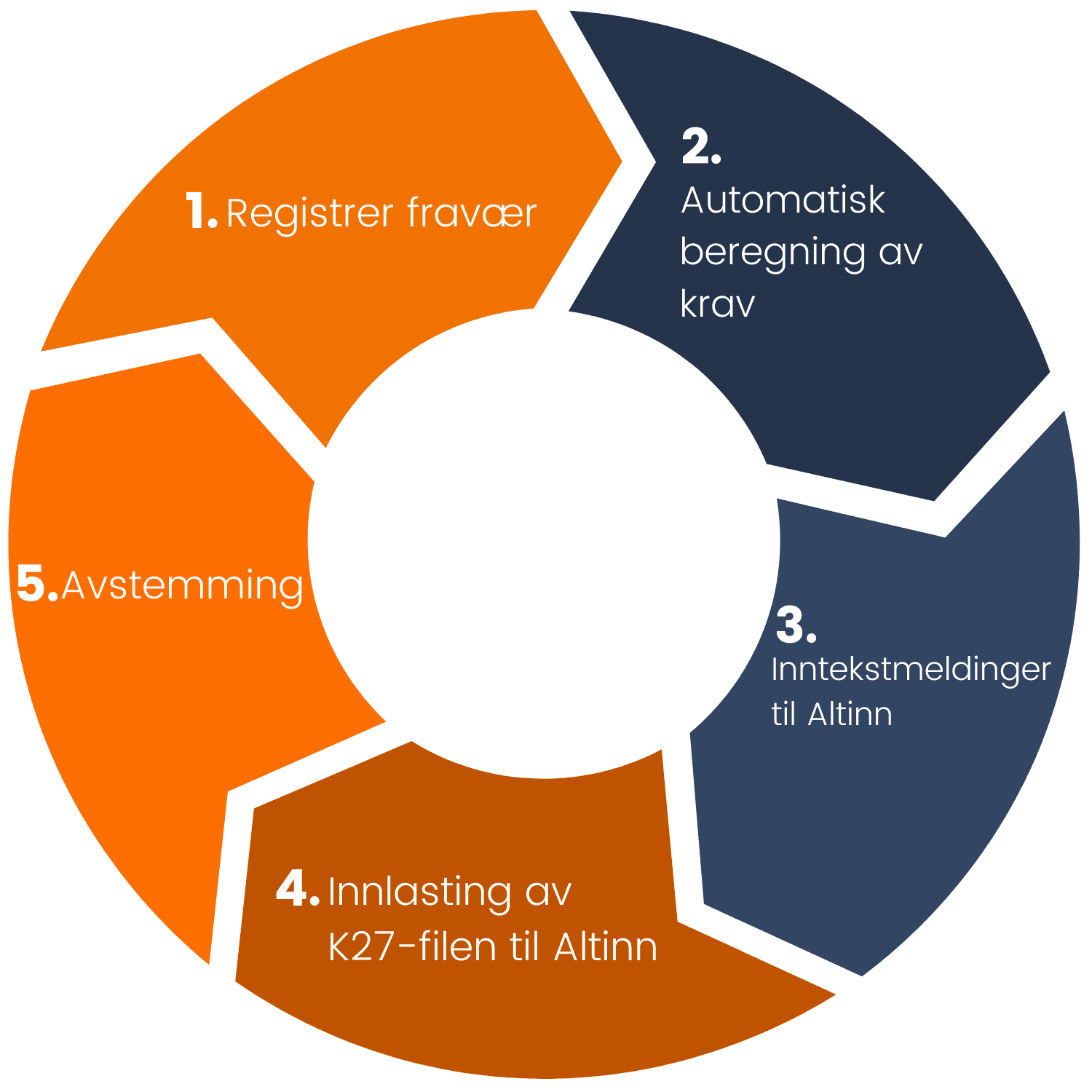
The process of using the reimbursement solution can be described as a rolling wheel. This means the process repeats in continuous new cycles.
How the reimbursement process works
- Absences are recorded either by HR in SAP, or by the employee (he/she records the absence in his/her timesheet)
- Based on registered absences, SAP will calculate any expected sickness benefit reimbursement in the next payroll run. These amounts are then used in the reconciliation report.
- Based on registered absences, SAP calculates the employer period, the national insurance period, and the reimbursement basis.
- SAP then generates an electronic income report with all the necessary information, making it ready to send to Altinn.
- The next step is simply sending the income report off to Altinn. This can be done directly from SAP, meaning you don't need to log in to altinn.no directly to submit your reimbursement claim.
- At the beginning of each month, you as an employer can log in to altinn.no to download the month's K27 list and save it to your computer. Then, you simply run a report to load the data into SAP.
- After the next payroll run, you can now go to the report for reimbursement reconciliation. In this report, the system compares the calculated reimbursement with the actual reimbursement received, as stated in the uploaded K27 list. With this report, you will easily spot any unpaid reimbursement claims, giving you a great opportunity to follow up with NAV.
The reimbursement module in SAP is simple and complex all at once. Simple for you to use, and complex because it keeps track of extensive regulations so you don't have to.